Lead pipeline automation is one of the most crucial automations that your law firm can implement. Each and every stage that a lead passes through has different processes and tasks that need to be completed manually.
The problem with this? It's difficult to scale.
When you're handling a few leads per week, manually creating tasks and following up isn't a big deal. But as your firm grows—10 leads, 20 leads, 50 leads per week—that manual process becomes a bottleneck. Tasks get forgotten. Follow-ups slip through the cracks. Leads go cold because someone didn't create the right task at the right time.
The Manual Task Problem
Think about what happens every time a lead moves through your pipeline:
- New Lead comes in: Someone needs to create tasks for initial outreach, qualification calls, and follow-ups
- Lead schedules a consultation: Different tasks need to be created—prepare for meeting, send confirmation, gather documents
- Lead becomes a client: Onboarding tasks, engagement agreement, payment setup, case file creation
Each stage transition requires someone to remember what tasks to create, then manually create them. That's a lot of mental overhead and room for human error.
The Solution: Automated Task Generation
When a lead moves to a new pipeline stage, automation instantly creates the tasks that stage requires. No one has to remember. No one has to do it manually. The right tasks appear for the right people at the right time.
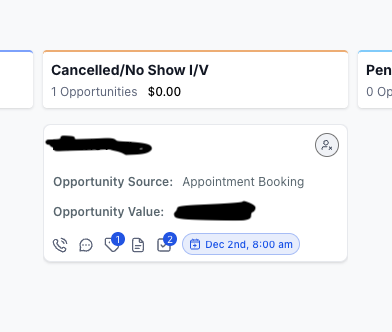
Stage: Cancelled/No Show I/V
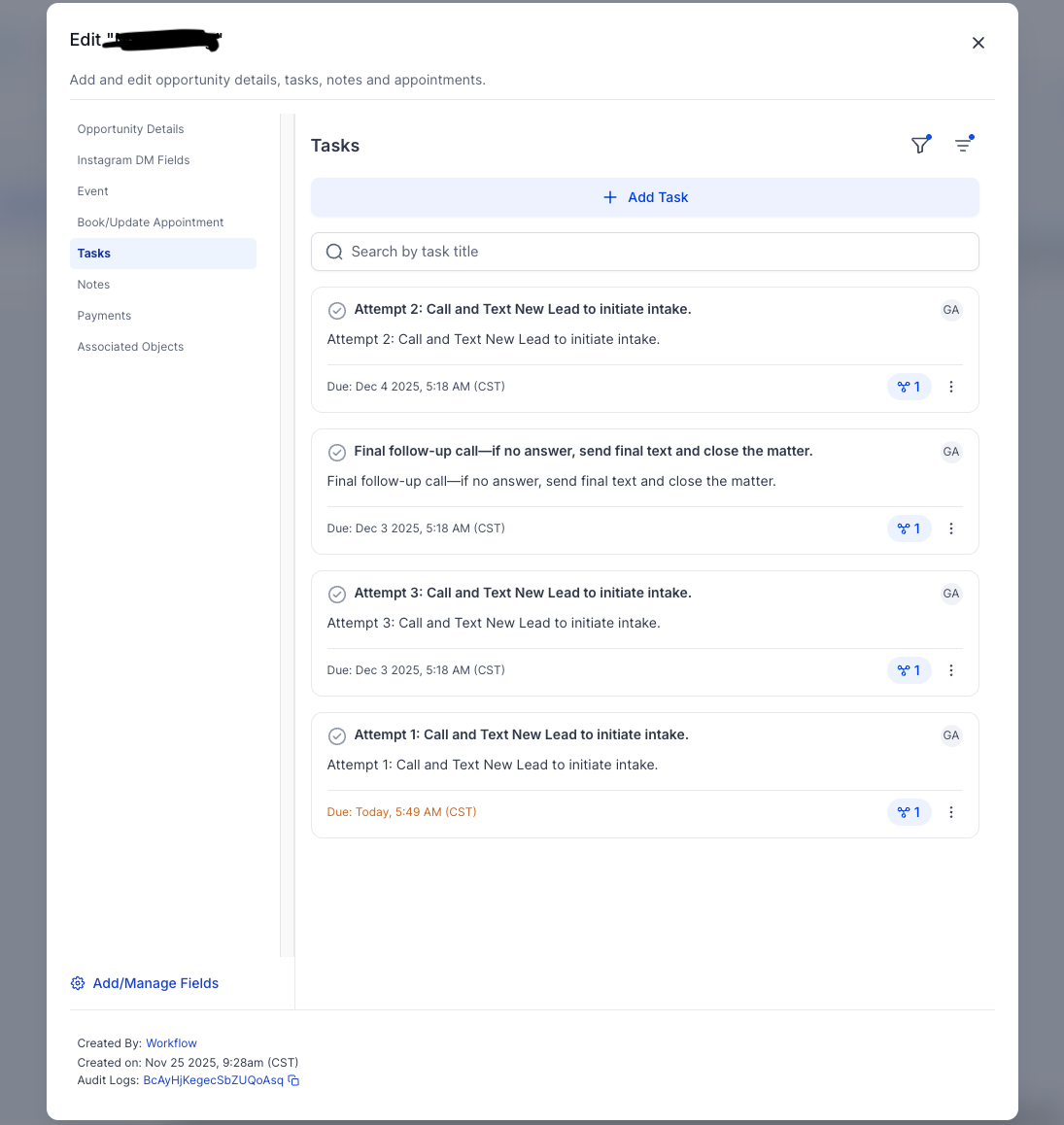
Lead didn't show up for their initial consultation—automation kicks in
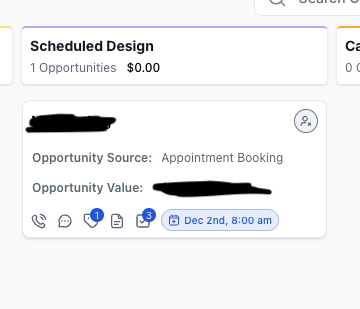
Stage: Scheduled Design
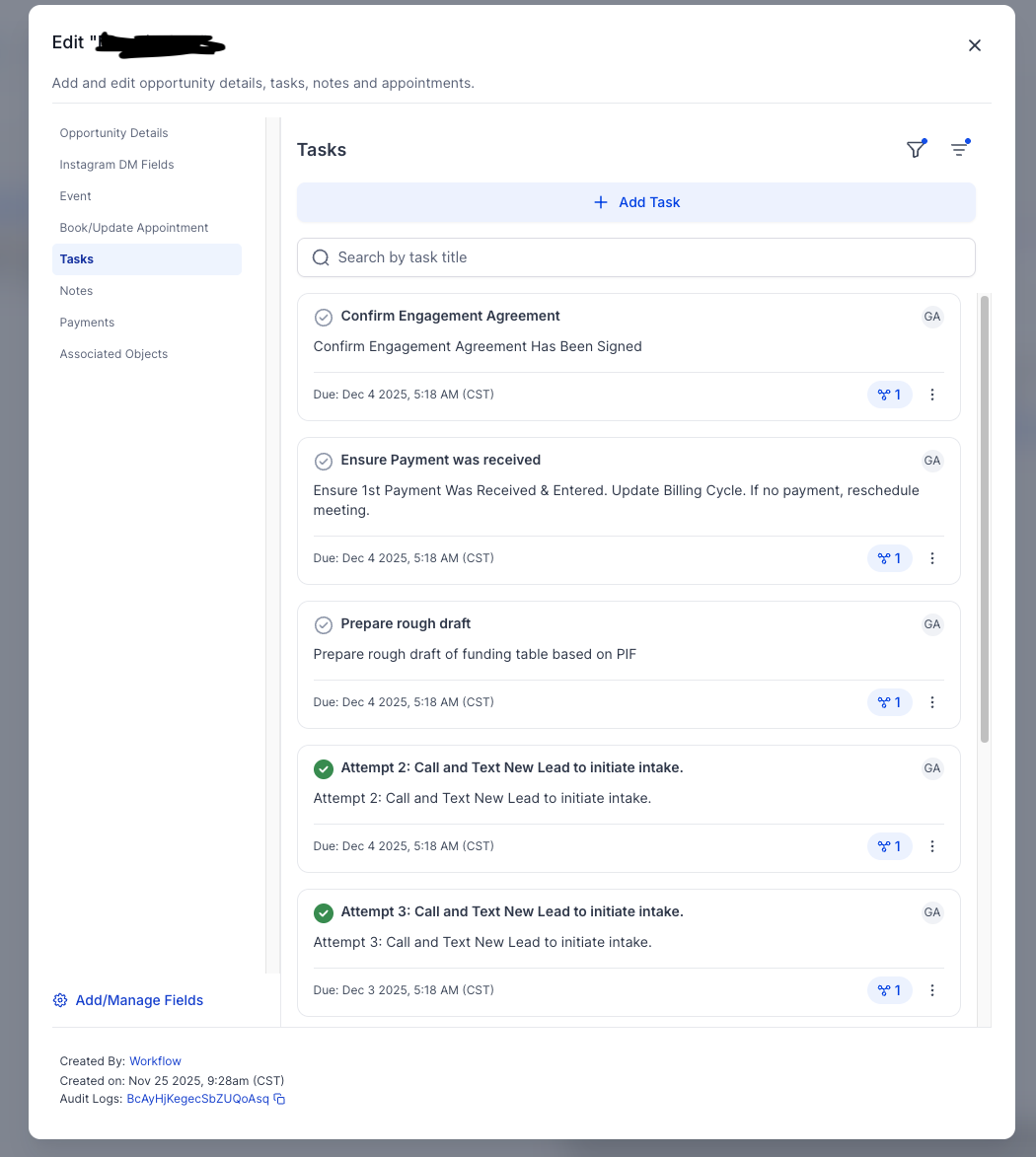
Lead scheduled their design meeting—different tasks are needed
Note: Sensitive information has been blacked out for client privacy.
How It Works
The automation monitors your CRM pipeline for stage changes. When a lead moves from one stage to another:
- Stage change detected: The automation sees that a lead has moved (manually or automatically) to a new stage
- Task template triggered: Based on the new stage, the correct task template is activated
- Tasks created: Tasks are automatically created with the right due dates, assignees, and descriptions
- Team notified: Assigned team members get notifications about their new tasks
No manual task creation. No remembering what needs to happen at each stage. The system handles it.
Real Examples From the Screenshots
In the "Cancelled/No Show" stage, you can see tasks like:
- Attempt 1, 2, 3: Call and Text New Lead to initiate intake
- Final follow-up call—if no answer, send final text and close the matter
In the "Scheduled Design" stage, completely different tasks appear:
- Confirm Engagement Agreement has been signed
- Ensure payment was received & entered
- Prepare rough draft of funding table based on PIF
Each stage has its own specific tasks. The automation knows exactly what's needed.
Nothing Falls Through
Every stage transition creates the right tasks. No more forgotten follow-ups.
Instant Task Creation
Tasks appear the moment a lead moves stages. No delay, no waiting.
Scale Your Team
Handle 10x the leads without 10x the manual work.
The Numbers Behind It
Industry research shows why automation matters for growing firms:
- 2 hours per day on admin tasks — Attorneys spend an average of 2 out of every 8 working hours on administrative duties like tracking and managing tasks (Smokeball/Clio)
- Only 2.9 billable hours per day — The average lawyer bills just 37% of their 8-hour workday, with the rest lost to non-billable work (Clio 2024 Legal Trends Report)
- 3-5 hours saved weekly — For medium-volume firms (20-50 leads/week), automating task creation at each pipeline stage typically saves 3-5 hours of manual work
- 26% of firms don't track leads — Many firms lose opportunities simply because there's no system to ensure follow-up tasks get created (ENX2 Marketing)
The Bottom Line
Your team shouldn't spend time creating tasks that could be automated. Every minute spent on manual task creation is a minute not spent on actual client work.
Pipeline stage automation ensures consistency, eliminates human error, and lets your firm scale without the operational overhead. When a lead moves, the right tasks appear—automatically.